SMTP Filter
The second tab under SMTP Setup allows you to set the filtering criteria for SMTP messages.
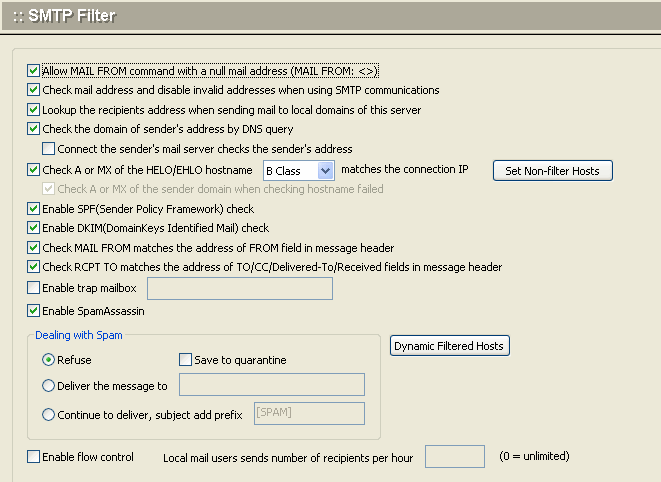
Use the following table for reference while completing this screen.
| Allow MAIL FROM command with a null mail address (MAIL FROM: <>) | Check this box to have the SMTP service allow MAIL FROM command with a null mail address (MAIL FROM: <>) |
| Check mail address and disable invalid addresses when using SMTP | Check this box to have the SMTP service check for valid delivery addresses and disable any invalid email addresses. |
| Look up the recipient's address when sending mail to this server | Check this box to have the SMTP service check for valid recipient addresses when messages are being sent to this server. |
| Check the domain of sender's address by DNS query | Check this box to have the SMTP service check the validity of the sender's address using a query to DNS |
| Connect the sender's mail server checks the sender's address | Check this box to have the SMTP service connects the sender's mail server and than checks the sender's address |
| Check A or MX of the HELO/EHLO hostname |
Check the A record or MX record of the HELO/EHLO Hostname to see if it matches the IP addressUse the Class pull-down menu to select the class of the IP address to be matched. For example: |
| Reject the HELO/EHLO hostname that is listed in "HELO/EHLO filter" | Check this box to reject email requests from the HELO/EHLO host(s) listed on the HELO/EHLO Filter tab. |
| Enable SPF(Sender Policy Framework) check | Check this box to enable SPF check. http://www.openspf.org/ |
| Check MAIL FROM matches the address of FROM field in message header | Check this box to check MAIL FROM matches the address of FROM field in message header. |
| Check RCPT TO matches the address of TO/CC/Delivered-To/Received fields in message header | Check this box to check RCPT TO matches the address of TO/CC/Delivered-To/Received fields in message header. |
| Enable trap mailbox | Check this box to enable trap mailbox. When some spam tools send a message to this mailbox, so that shielded the ip address for a while |
| Dealing with spam | SMTP receive mail filtering to the above action, if judged as spam, this message to the following actons: 1. Rejected - SMTP communication process, the direct return of error. 2. Sent the message to mailbox - all the spam sent to the designated-mail. 3. Prepend the mesage's subject with a string - the subject of spam increased [SPAM] string, continue to transmit to the recipient. |
.To apply your changes, click the Apply button.
.To cancel current settings and return the screen to its state after the last "Apply" operation, click the Reset button.