LDAP Client
The built-in LDAP server enables access to public contacts stored in server for email client programs supporting the LDAP protocol (Lightweight Directory Access Protocol).
Start LDAP Server
Under "Domain Settings" function, enable "In the domain, add personal information to public contacts"
Mail clients settings
User can see public contacts in our Webmail
The following information should be considered to enable a mail client to access contacts stored in Server by the LDAP protocol.
LDAP server:
DNS name (e.g. mail.ourcompany.com) or IP address (e.g.192.168.1.1) of the host that Winmail server is running on.
Username and Password:
This data is used by users to log into the LDAP server (equal to the name and password for user login to mailboxes).
The LDAP server in Winmail server can support anonymous logins.
Port: The default port is 389, you can change it.
Search base:
This item should include the root of the LDAP database, where the contacts are stored.
Winmail server uses the root called "o=magicwinmail" to store contacts.
When you use Outlook, let the field blank.
Example of Configuration - Outlook Express
The LDAP account is defined in the Tools / Accounts / Directory Service menu. New accounts can be added with the wizard, however, you must open the Properties dialog to define all the required parameters.
General folder:
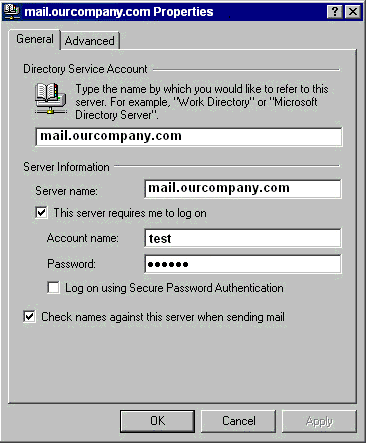
Check names against this server when sending mail If this option is enabled, personal email addresses will be searched for automatically when a message is sent. This means that names can be used instead of full email addresses in the To field (or Copy To or Blind Carbon Copy To). The appropriate email addresses will be changed when the email is sent.
Note: If an inserted name cannot be found, the message will not be sent by Outlook Express and the user must correct the name or insert the full email address. If there are more addresses for one name, a dialog for user/address selection will be displayed.
If need input BaseDN, please use o=magicwinmail