ETRN Download
ETRN is an extended function of the SMTP server. Use the ETRN option of SMTP to request mail delivery from a specified mail system queue as an alternative to POP3 distribution. Select ETRN Setup from the System Setup -> Mail Gateway menu to display the following screen.
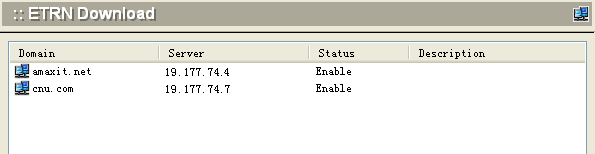
To add an ETRN account, click the Add button at the bottom of the screen. The following dialog box will appear.
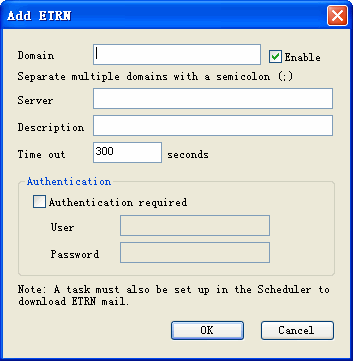
Use the following table for reference in completing this dialog box.
| Domain | Domain name of the ETRN account. |
| Enable | Check this box to enable ETRN mail retrieval. |
| Server | IP number of the ETRN server |
| Description | User-supplied description for this account. |
| Time Out | Number of seconds the server will wait for delivery before timing out |
| Authentication Required | Check this box to ensure authentication of mail service on this server. |
| User | If authentication is required, enter the authorized username. |
| Password | If authentication is required, enter the authorized password. |
Note: To successfully use ETRN download, a task must be set up in the Scheduler that is specifically assigned to retrieving ETRN mail. See System Setup -> Scheduler.
.Click OK to accept the ETRN server settings.
.To modify an existing setting, select the ETRN server from the ETRN screen and click the Modify button.
.To delete an existing ETRN setting, select the ETRN server from the ETRN screen and click the Delete button.
.Use the Refresh button to update the database and refresh the screen.