Internet Settings
The Internet Setting option on the main menu allows the administrator to configure how the mail server interacts with the Internet. The Internet Setting screen allows the administrator to specify Proxy Settings.
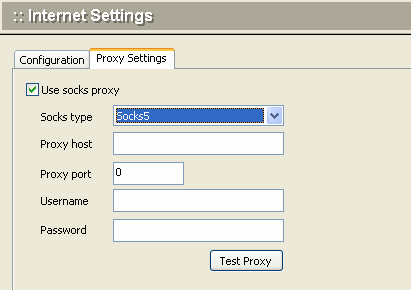
| Use socks proxy | Check this box if you use the socks proxy protocol. |
| Proxy type | Select the type of socks proxy in use. |
| Proxy host | Enter the domain name or IP address of the proxy host server. |
| Username | Enter the user name by which you will access the proxy server. |
| Password | Enter the password by which you will access the proxy server. |
| Test Proxy | Click this button to send a test message to the proxy server. |