License
Winmail Server is available as a free download with a limited number of mailboxes, for 90-day trial. At the end of 90 days the software will no longer function properly without purchasing and registering the software. To purchase and/or register the software, select the License option from the System Setup menu. The following screen will appear.
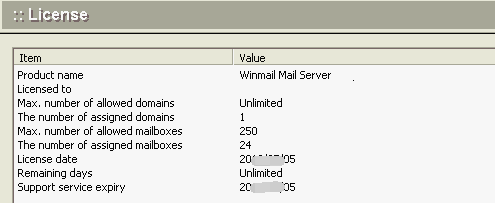
| Product name | The version and build number of the Winmail Server software you are using. |
| Licensed to | User name to whom the software is licensed. |
| Max. number of mailboxes | Maximum number of mailboxes allowed. |
| Mailboxes used | The number of mailboxes has been add. |
| Install date/License date | License date. If not licensed, this field displays installation date. |
| Remaining days | Days remaining under terms of current license. |
To buy the software, click the Buy Now button at the bottom of the screen. You will be connected to the Winmail Server website where you can purchase the software and obtain license key information on-line. If you have already received your license key, click the Register button at the bottom of the screen. The following dialog box will appear.
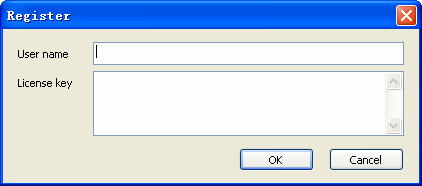
Copy the license key from the email you received when you purchased the software. Do not include spaces or new lines when entering the license key. Once you are properly registered, the license screen should accurately display the number of mailboxes that you are allowed.
Notes:
If you receive an "Invalid License" message, a register code fault will be displayed. Note this register code for future reference, and try again.
If you are unable to register after several attempts, contact technical support at register@winmail.cn
If the register code is correct but the system still shows "Invalid License," check to be sure you have enough licenses for all existing users.